
Enable the server
Open the settings
Open Settings → Integrations in the Ombra manager.
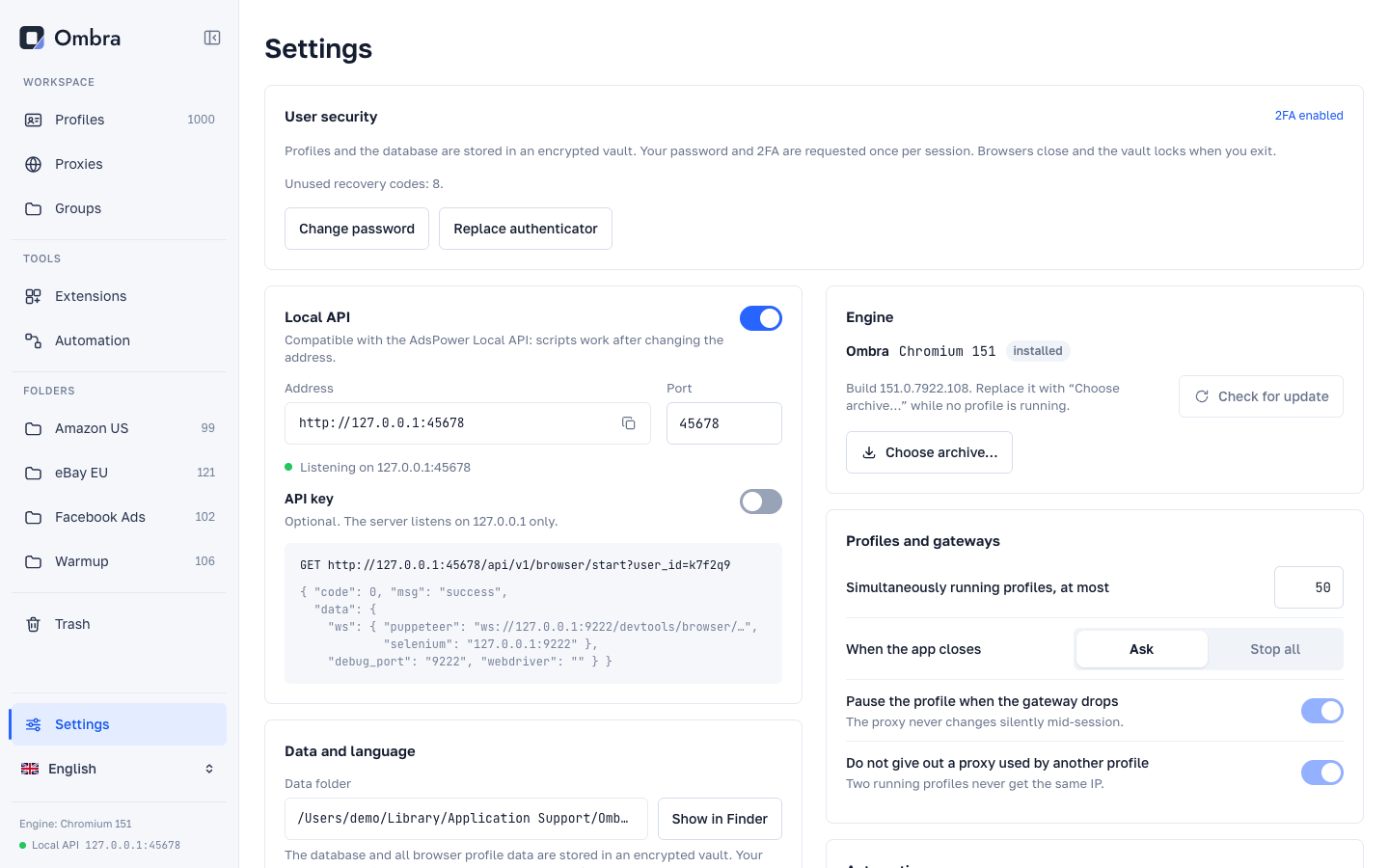
Turn on the server
Start Local API. The manager begins listening on
127.0.0.1; nothing is exposed to other computers.Check the port
The default port is
45678. Change it if another program already uses that port, then apply the setting and restart the server if the manager asks.Decide on the key
Leave the API key disabled when only local scripts use the API. Enable it when other people or untrusted tools can run code on the same computer.
Address, port and hosts
Use http://127.0.0.1:45678 as the base address. The manager accepts the Host values 127.0.0.1, localhost, [::1], local.adspower.net and local.adspower.com. The last two are accepted for scripts migrated from AdsPower.
Requests that carry Origin or Sec-Fetch-Site are treated as page requests and rejected. Command-line tools and HTTP clients usually send neither header.
API key
The key is optional. When it is enabled, every request must include Authorization: Bearer <key>. A request without the header or with a wrong key returns code: -1 and a message about authorization. The same header works for GET and POST.
Store the key outside the script, for example in an environment variable. Do not put it in a page, a browser extension or a public repository. A local-only server is not a reason to publish the key.
curl http://127.0.0.1:45678/status \
  -H 'Authorization: Bearer YOUR_API_KEY'
Check the connection
Send a request to /status before starting a profile. A working server returns code: 0. A connection error means the manager is closed, the server is disabled, or the port in the URL differs from the port in settings. A response with code: -1 means the server is running but rejected the request; read msg. A timeout usually means a firewall or a wrong address.
curl http://127.0.0.1:45678/statusGET and POST are equivalent, so the check works with any HTTP client. There is no rate limit; repeated status checks do not block other requests.
Prepare the client
- The base URL with the port that the manager actually uses.
- The API key if it is enabled, sent as a Bearer token.
Content-Type: application/jsonand a JSON body for POST requests.- A profile identifier for every method that works with one profile:
profile_idorprofile_noin v2,user_idorserial_numberin v1.
 1:1
The first full request is described in Requests and responses, and the launch call is in Launch and stop a profile. If the server does not answer, use Errors and troubleshooting.