
The sidebar groups sections by task. The status line at the bottom reports the browser build and the Local API address, so both are visible without opening Settings.
Sidebar
The Workspace group contains Profiles, Proxies and Groups. Tools contains Extensions, Automation and Window sync. Trash and Settings follow, and the account item is at the very bottom.
- Profiles — the browser profiles, search, filters and bulk actions.
- Proxies — saved proxies, import and check results.
- Groups — groups and the number of profiles in each one.
- Extensions — extension sets for profiles.
- Automation — workflows, tasks and the run journal.
- Window sync — repeats actions from a main window in selected windows.
- Trash — deleted profiles that can be restored or removed for good.
- Settings — app-wide settings, the browser build and integrations.
Profile table
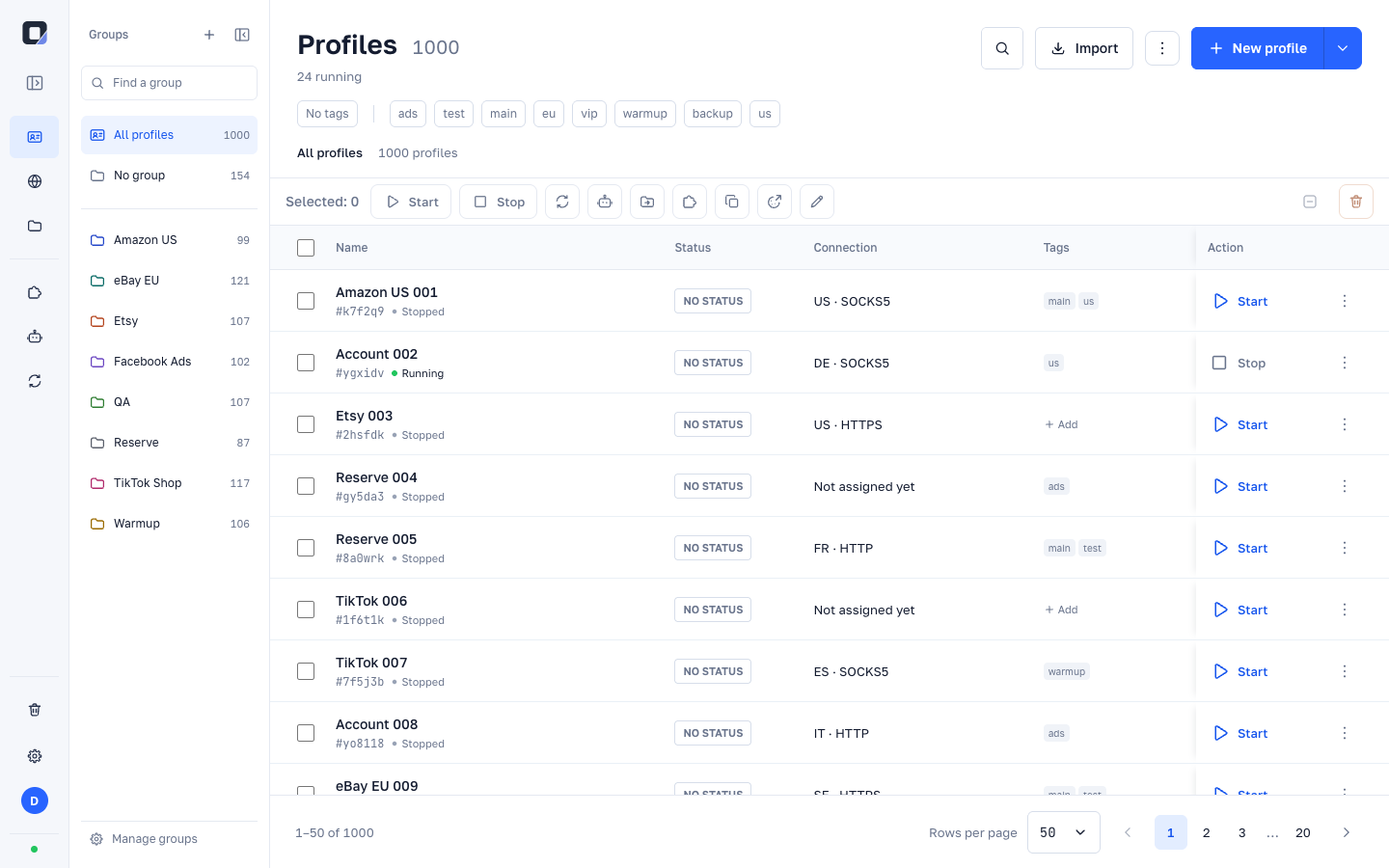
Above the table are the search field, Import, the more menu and New profile. The table shows one row per profile and updates the launch state in place.
| Column | What it shows |
|---|---|
| Name | The profile name, its short ID and the current launch state. |
| Status | The user status. Built-in BAN, READY and NEW cannot be renamed or deleted; an empty status is NO STATUS. |
| Connection | The proxy pinned to the profile, or Not assigned yet. |
| Tags | Tags of up to 30 characters and the add control. |
| Action | Start or Stop for the row and the row menu with further actions. |
Selecting profiles opens the bulk bar: Start, Stop, Synchronize, Run workflow…, Move to group, Create a copy, Extensions and Delete. Synchronize starts any stopped selected profiles and begins a session when at least two profiles are running.
The column menu hides and shows the number, group, fingerprint, creation date and last launch.
 1:1
Launch states
The launch state is shown under the profile name, next to the short profile ID. It describes the browser window, not the user status in the Status column.
| State | What it means |
|---|---|
| Stopped | The browser is closed and the profile can be started. |
| Starting | Ombra is starting the browser; the window is not ready yet. |
| Waiting to start | The browser is waiting in the launch queue. |
| Running | The browser window is open. |
| Paused | The proxy gateway does not respond; the browser stays open and requests fail instead of switching to another proxy. |
| Failed | The browser process ended with an error. |
Manager access
Manager version 1.2.1 depended on the retired Ombra sign-in service and can no longer open its workspace.
Ombra has no product quotas on profiles, concurrent browsers, workflows, built-in CAPTCHA or devices. Actual concurrency depends on your execution settings and computer resources.
Status line and Local API
The bottom of the sidebar reports the installed browser build as Browser: Chromium 151, or Browser not installed until the build is downloaded.
The Local API line shows 127.0.0.1:45678 while the API is running and off when it is disabled. The port is changed in Settings → Integrations, and scripts use the same address.